ChatGPT says you’ve reached the maximum length for this conversation
The chat is full and won’t take new messages, but nothing is lost. Here is how to carry on in a new chat, and how to avoid the wall next time.
Updated November 2026
How to do it
- 1
Open a new chat
The old thread stays in your sidebar and you can still read it. It just can’t take more messages.
- 2
Bring the key points
Copy the last long answer and the decisions you need, paste them into the new chat, and say what comes next. If you saved a jot earlier, just say “continue my last handoff”.
- 3
Save before the wall next time
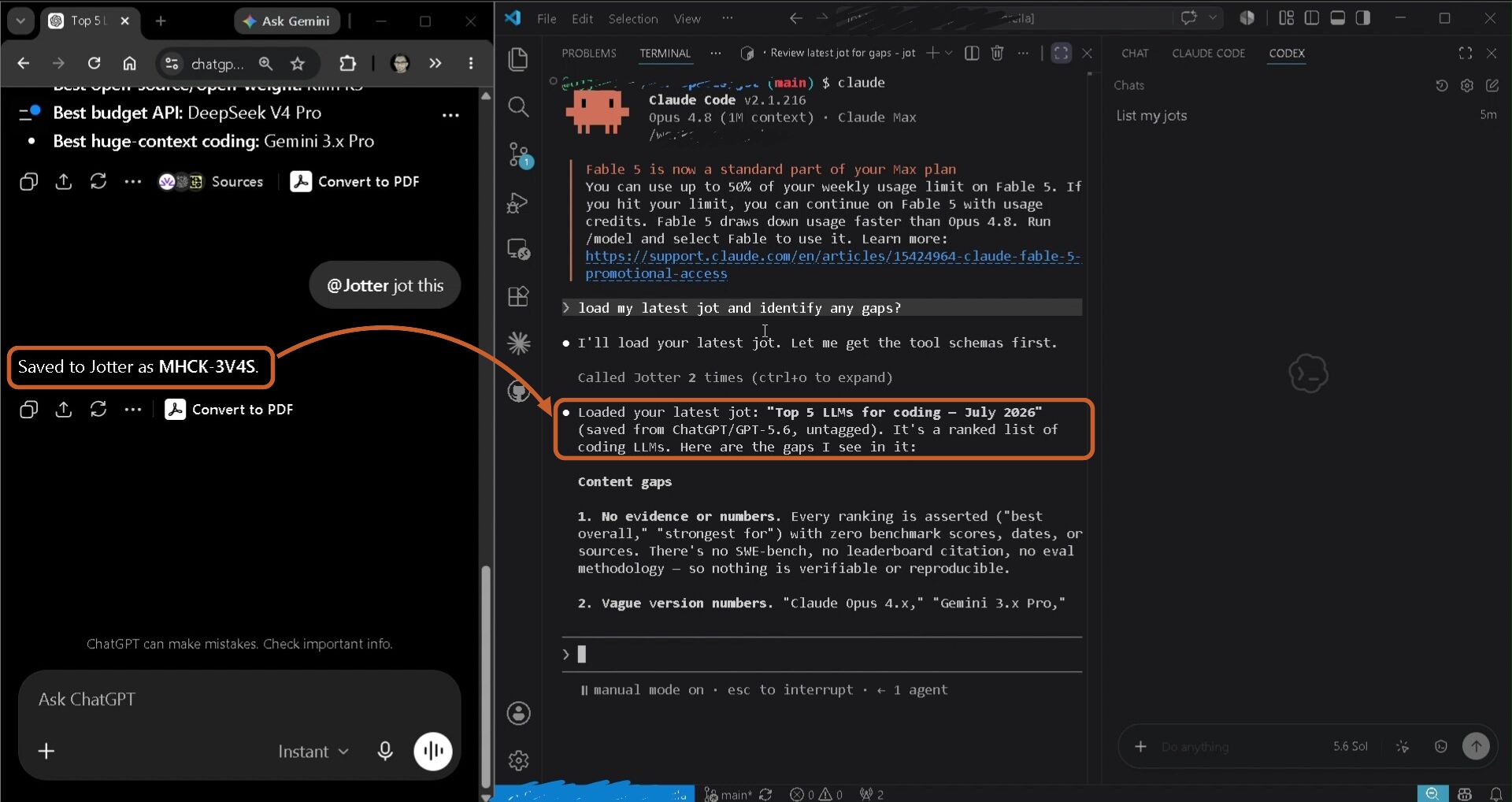
With Jotter connected, say “jot this” when a chat gets long. The assistant writes the handoff and Jotter saves it, so the next chat starts with everything it needs.
You're in an app's built-in browser, which isn't signed in to ChatGPT. Tap the menu (⋯) and choose Open in browser first.
Free for 10 jots, no card. About a minute to set up.
What it looks like
A real save in ChatGPT, then the same jot loaded in Claude Code.
Why it happens
Each ChatGPT conversation can only hold so much text, counting your messages, its replies, and anything you paste or upload. When it is full, ChatGPT stops the thread and asks you to start a new chat. OpenAI does not publish the exact limit, and in October 2026 users reported hitting it sooner than before. Long chats usually get slower and start forgetting early details before they hit the wall, which is a good moment to hand off.
Worth a try: branch from an earlier message
ChatGPT’s More actions menu on a message has Branch in new chat, which starts a new conversation from that point. Branching from a message a little before the end may leave enough room to ask for a handoff there. It depends on how full the thread was, so if it doesn’t work, use the copy and paste route above.
Next time, keep a handoff outside the chat
Jotter saves a handoff while the chat can still reply. Say “jot this” when a thread gets long, then say “continue my last handoff” in a new chat, or in Codex or Claude. It works in the ChatGPT app on your phone with no browser extension, and the note stays saved after the chat is gone. Free for 10 jots.
Questions
What does “You’ve reached the maximum length for this conversation” mean?
The conversation has filled everything ChatGPT can keep in one chat. You can usually still read the thread, but not add to it. Start a new chat and bring the key points over.
Will I lose the old conversation?
No. It stays in your chat history, and you can read it and copy from it. It just won’t accept new messages.
Can Jotter save from a chat that has already hit the limit?
No. Jotter saves when you ask the assistant, and a locked chat can’t take the request. Save a jot before the wall, or try branching from an earlier message.
Why does ChatGPT forget things before it hits the limit?
When a chat gets long, the oldest parts drop out of what the model can see, even though they still show on screen. Starting a new chat from a handoff note brings back what matters.
How much does Jotter cost?
Free for 10 jots, kept forever. Pro is under $2 a month, billed $19 a year, for 5,000 jots.
Free for 10 jots, no card. About a minute to set up.
More guides
Continue a ChatGPT chat in a new chatMove a conversation from ChatGPT to ClaudeContinue a ChatGPT conversation in GeminiContinue a Claude Code session in CodexMove a Cursor chat to Claude Code